



NU-X Core Series Verb Core Deluxe Reverb Effects Pedal


Shape your tone with advanced routing. Modify your tone with Modulation.
The NUX MOD CORE DELUXE MKII is a modulation pedal with 8 different types including ST.CH (Stereo Chorus), CE-1, SCF CHO, SCF FLG, SCF P.M., U-VIBE CHO, U-VIBE VIB and PH-100. You can switch the mod types by way of the Type rotary switch.
This pedal offers advanced signal routing with the included Send and Return. Easily split the mono signal to create customized effect loops! Additionally, you can parallel the 2 signals, and use the Tweak knob in Alt mode to blend the signals. Use the 3-way toggle switch to the desired position, and you are good to go. Keep reading below for more signal routing ideas
FEATURES:
- 8 reverb types in a compact enclosure.
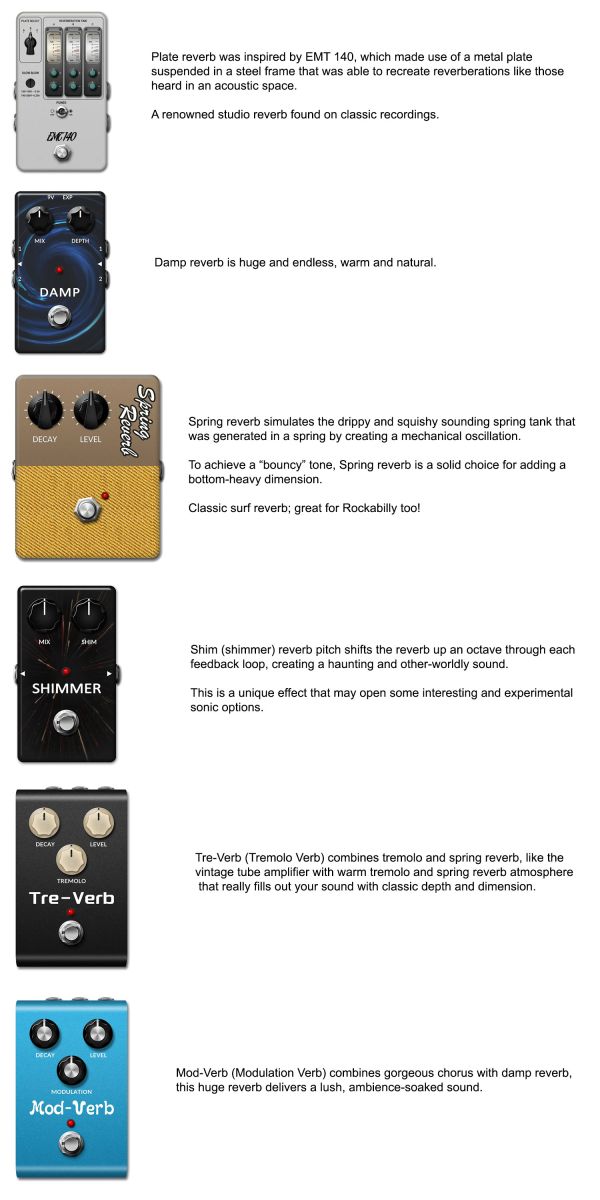
- Room, Hall, Plate, Damp, Shim, Spring, Tre-Verb, Mod-Verb.
- Freeze function.
- True-bypass or Buffer-bypass(Tails).
- Supports Stereo.
- Kill Dry.
- Low power consumption. (less than 120mA)
- Analog dry signal for low noise and zero latency.
SPECIFICATIONS:
- Input Impedance: 1M ohms
- Output Impedance: 1K
- Dynamic Range: 104 dB
- DSP Processing: 48KHz / 32-bit
- A/D D/A Sampling Rate: 48KHz / 24-bit
- Power: 9V DC (Negative tip, Optional ACD-006A adapter)
- Current Draw: less than 120mA
- Dimensions (L x W x H): 122mm x 72mm x 47mm
- Weight: 270g
Ambience in Motion
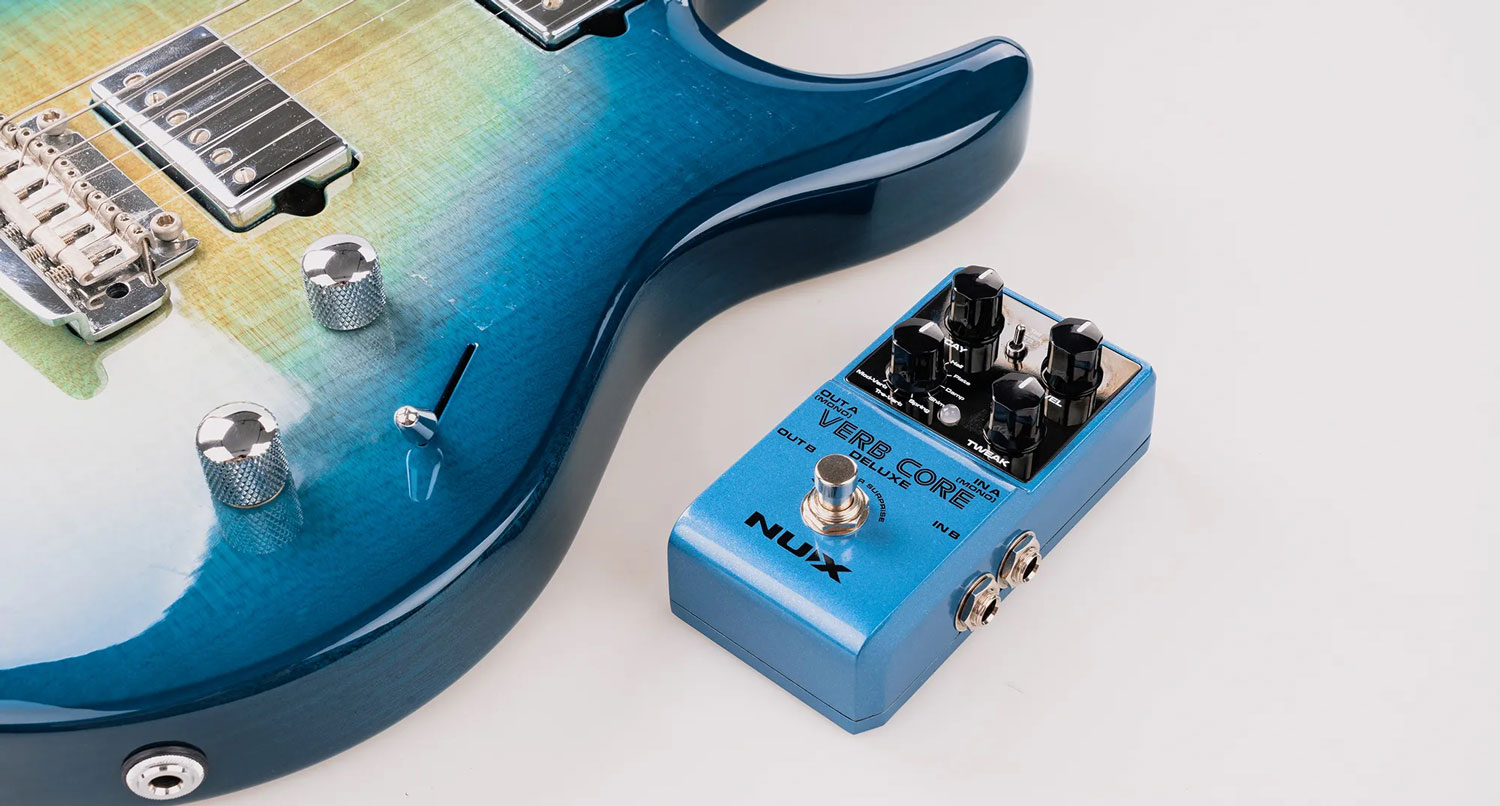
The NUX VERB CORE DELUXE is a reverb pedal with 8 different types including Room, Hall, Plate, Damp, Shim, Spring, Tre-Verb and Mod Verb. You can select the reverb type by using the Type knob.
*All of the brand and model names mentioned on this page are Trademarks of their respective owners, which are in no way associated or affiliated with NUX Effects and Cherub Technology CO. LTD.
An Intuitive User Interface
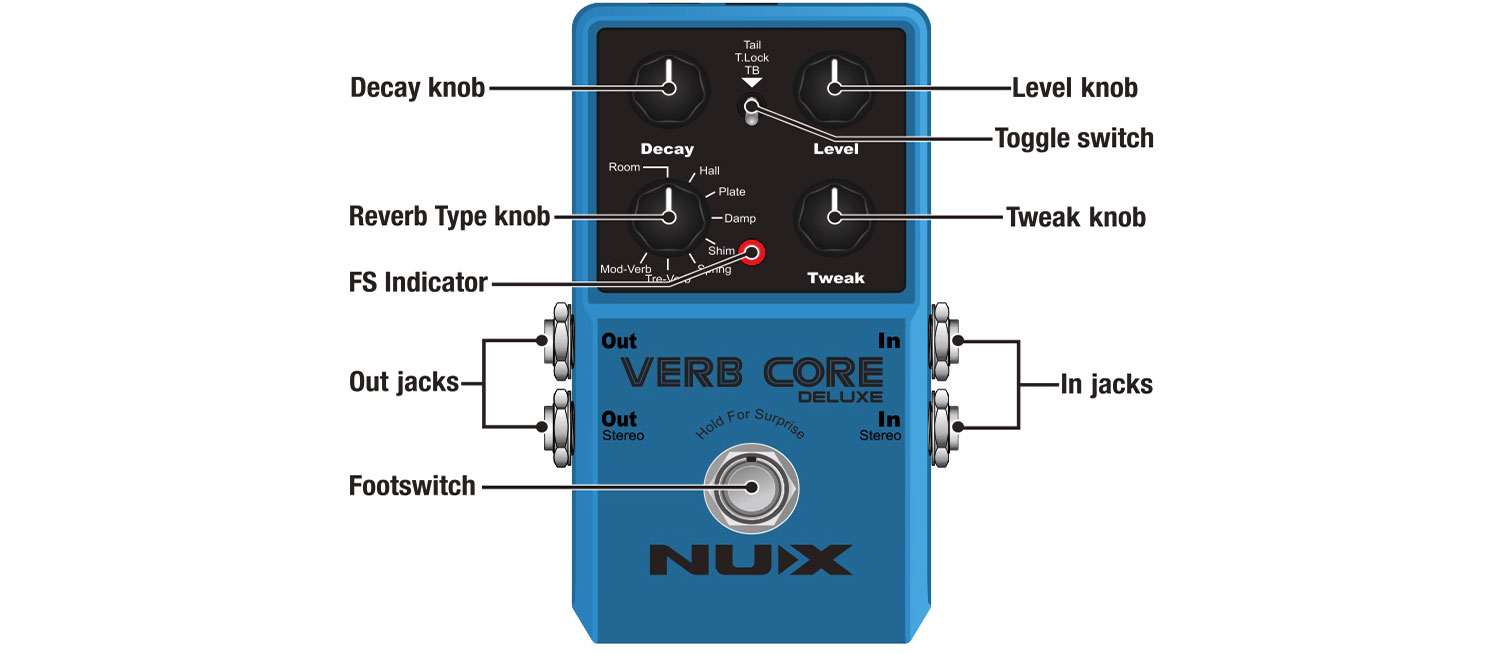
DECAY KNOB:
Adjusts the length of reverb time
LEVEL KNOB:
Adjusts the wet/dry mixing level of reverb, from 0% up to 100% when you turn the knob clockwise.
REVERB TYPE KNOB:
Selects the Reverb type.
TWEAK KNOB:
Adjusts a specific parameter for each reverb type.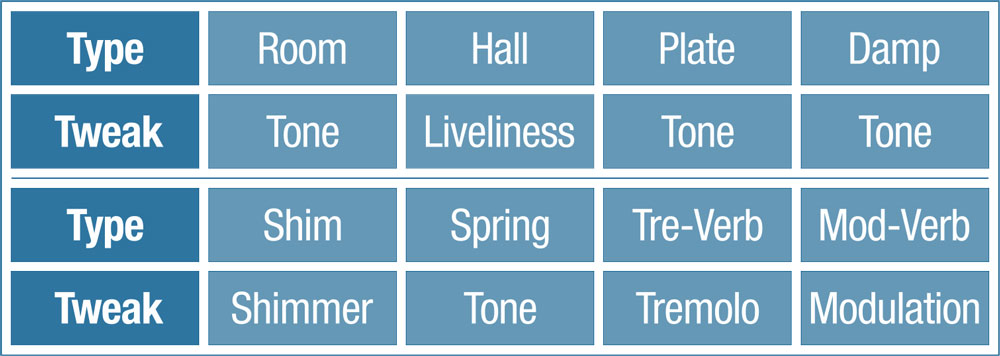
TOGGLE SWITCH:
The Toggle switch is used to go between True/Buffer Bypass and our unique Tone Lock feature.
- TAIL to set the pedal to Buffer-Bypass to keep the reverb spillover while you disengage the effect.
- T.LOCK means Tone Lock. The T.Lock (Tone Lock) function is a quick way to store and lock your current parameter setting to prevent accidents while on stage. After you set the parameters, just toggle the switch to T.Lock position, then the LED indicator will flash GREEN 2 times to store and lock the parameters. Then you can engage or disengage the effect by the footswitch worry free.
- TB means True-Bypass, there is no spillover while you disengage the effect.
FOOTSWITCH & FS INDICATOR:
Press once to engage/disengage the effect. While you engaged the effect, press and hold the footswitch can trigger Freeze function. (Hold For Surprise)
While the effect is engaged, the FS indicator will show "Red" While the effect is disengaged, the FS indicator will turn off.
KILL DRY:
This function allows you to get fully proceed signals without any dry signals, so you are able to get pure dry amp sound and pure wet amp sound with paralleled gear chain. Or to reach a new level of ambiance effects if the original mixing is just not enough for your ideas.
I/O Jacks
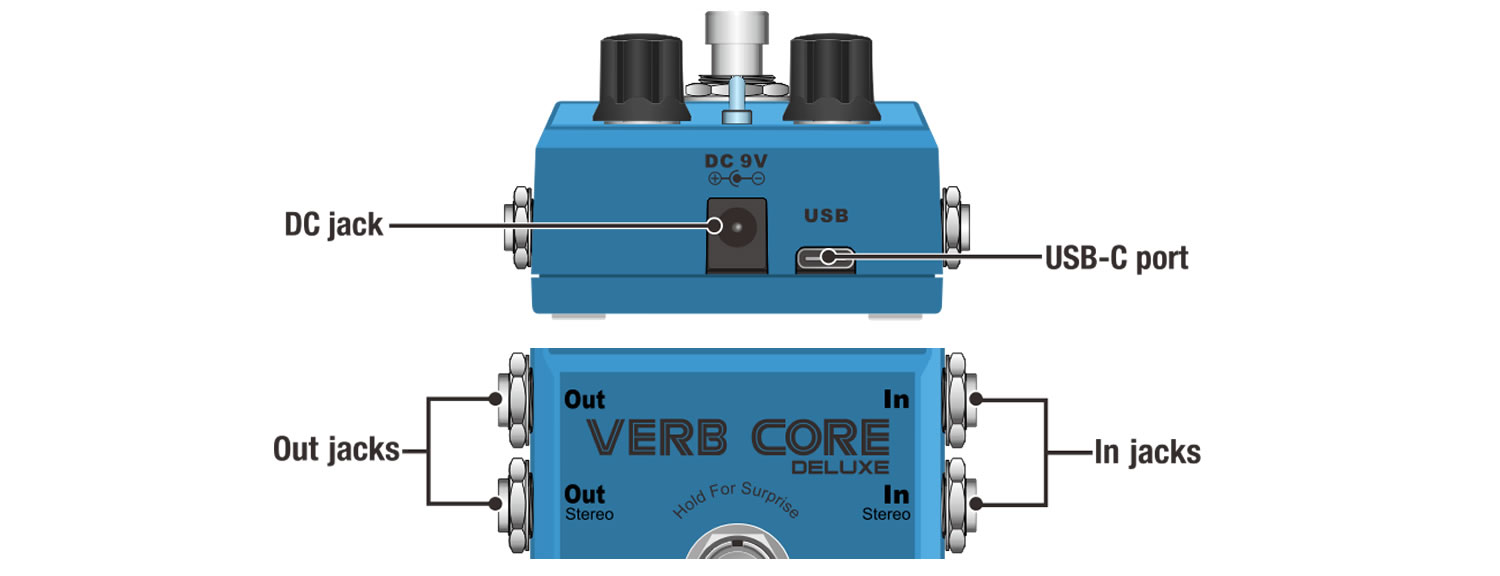
DC JACK:
Use ONLY: 9V Negative Tip power with more than 150mA. (The power consumption is less than 110mA.)
USB-C PORT:
The USB-C port is for firmware updates. Connect a USB cable to your PC and hold the footswitch to boot-up the device and to enter the DFU (Device Firmware Update) mode. Once connected you can do firmware updates using DFU updater software. Download the related firmware and firmware update guide from product page.
IN JACKS:
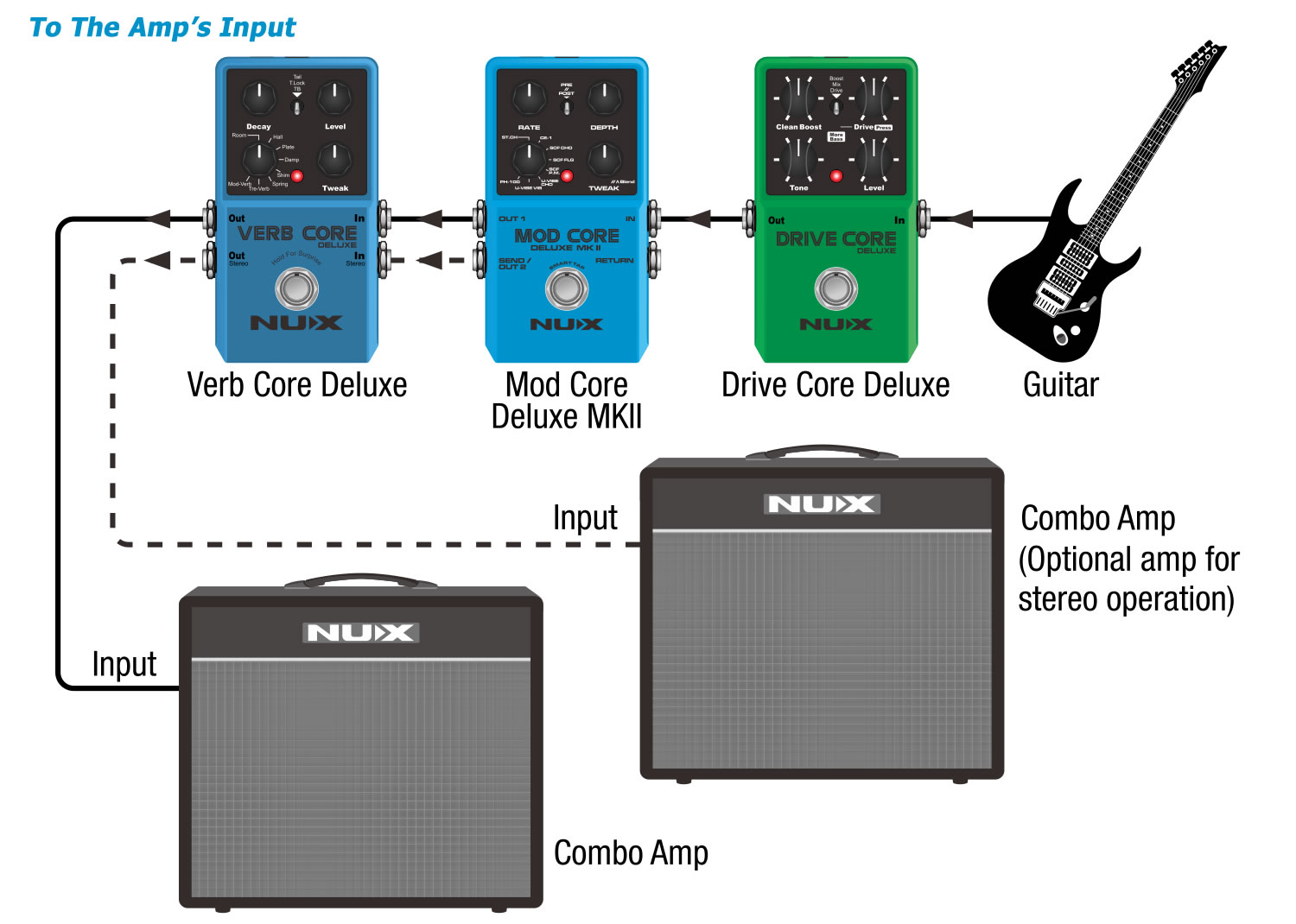
The audio inputs on the right side of this pedal are standard 1/4" jacks (mono/TS). Connect your guitar to the In (mono) audio input on the right side of your pedal using a regular 1/4" instrument cable.
The pedal also accepts stereo signals using a pair of 1/4" TS cables, to provide a TURE STEREO output.
For the Mono/Stereo connection applications, please see below.
OUT JACKS:
The audio outputs on the left side of this pedal are standard 1/4" jacks (mono/TS). Connect the audio output of your pedal to the next device in the signal chain, either with a single cable or with a pair of 1/4" cables if both inputs are used.
For the Mono/Stereo connection applications, please see below.
Connections
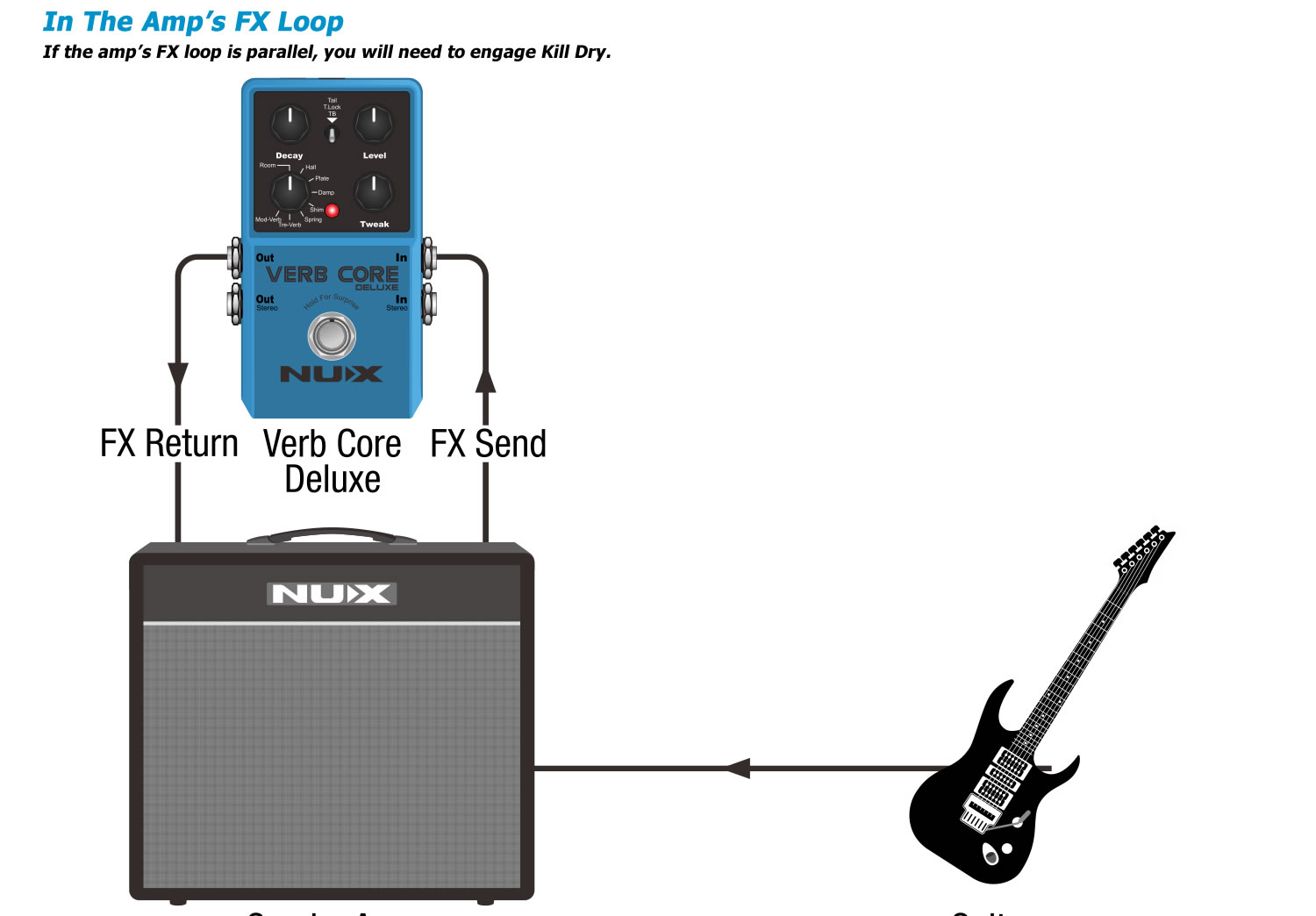
Kill Dry: Without the USB connection, hold the footswitch to boot-up the pedal, if the LED indicator flashes GREEN 3 times, the KILL DRY is engaged. If the LED indicator flashes RED 3 times, the KILL DRY is disengaged. (Normal)

Availability (Please click here for availability info):
STANDARD OR EXPRESS SHIPPING AVAILABLE AUSTRALIA WIDE
Get great standard or express shipping rates on orders under $250 - or our FREE SHIPPING offer is available on non-bulky orders over $250! - READ MORE
Shape your tone with advanced routing. Modify your tone with Modulation.
The NUX MOD CORE DELUXE MKII is a modulation pedal with 8 different types including ST.CH (Stereo Chorus), CE-1, SCF CHO, SCF FLG, SCF P.M., U-VIBE CHO, U-VIBE VIB and PH-100. You can switch the mod types by way of the Type rotary switch.
This pedal offers advanced signal routing with the included Send and Return. Easily split the mono signal to create customized effect loops! Additionally, you can parallel the 2 signals, and use the Tweak knob in Alt mode to blend the signals. Use the 3-way toggle switch to the desired position, and you are good to go. Keep reading below for more signal routing ideas
FEATURES:
- 8 reverb types in a compact enclosure.
- Room, Hall, Plate, Damp, Shim, Spring, Tre-Verb, Mod-Verb.
- Freeze function.
- True-bypass or Buffer-bypass(Tails).
- Supports Stereo.
- Kill Dry.
- Low power consumption. (less than 120mA)
- Analog dry signal for low noise and zero latency.
SPECIFICATIONS:
- Input Impedance: 1M ohms
- Output Impedance: 1K
- Dynamic Range: 104 dB
- DSP Processing: 48KHz / 32-bit
- A/D D/A Sampling Rate: 48KHz / 24-bit
- Power: 9V DC (Negative tip, Optional ACD-006A adapter)
- Current Draw: less than 120mA
- Dimensions (L x W x H): 122mm x 72mm x 47mm
- Weight: 270g
Ambience in Motion
The NUX VERB CORE DELUXE is a reverb pedal with 8 different types including Room, Hall, Plate, Damp, Shim, Spring, Tre-Verb and Mod Verb. You can select the reverb type by using the Type knob.
*All of the brand and model names mentioned on this page are Trademarks of their respective owners, which are in no way associated or affiliated with NUX Effects and Cherub Technology CO. LTD.
An Intuitive User Interface
DECAY KNOB:
Adjusts the length of reverb time
LEVEL KNOB:
Adjusts the wet/dry mixing level of reverb, from 0% up to 100% when you turn the knob clockwise.
REVERB TYPE KNOB:
Selects the Reverb type.
TWEAK KNOB:
Adjusts a specific parameter for each reverb type.
TOGGLE SWITCH:
The Toggle switch is used to go between True/Buffer Bypass and our unique Tone Lock feature.
- TAIL to set the pedal to Buffer-Bypass to keep the reverb spillover while you disengage the effect.
- T.LOCK means Tone Lock. The T.Lock (Tone Lock) function is a quick way to store and lock your current parameter setting to prevent accidents while on stage. After you set the parameters, just toggle the switch to T.Lock position, then the LED indicator will flash GREEN 2 times to store and lock the parameters. Then you can engage or disengage the effect by the footswitch worry free.
- TB means True-Bypass, there is no spillover while you disengage the effect.
FOOTSWITCH & FS INDICATOR:
Press once to engage/disengage the effect. While you engaged the effect, press and hold the footswitch can trigger Freeze function. (Hold For Surprise)
While the effect is engaged, the FS indicator will show "Red" While the effect is disengaged, the FS indicator will turn off.
KILL DRY:
This function allows you to get fully proceed signals without any dry signals, so you are able to get pure dry amp sound and pure wet amp sound with paralleled gear chain. Or to reach a new level of ambiance effects if the original mixing is just not enough for your ideas.
I/O Jacks
DC JACK:
Use ONLY: 9V Negative Tip power with more than 150mA. (The power consumption is less than 110mA.)
USB-C PORT:
The USB-C port is for firmware updates. Connect a USB cable to your PC and hold the footswitch to boot-up the device and to enter the DFU (Device Firmware Update) mode. Once connected you can do firmware updates using DFU updater software. Download the related firmware and firmware update guide from product page.
IN JACKS:
The audio inputs on the right side of this pedal are standard 1/4" jacks (mono/TS). Connect your guitar to the In (mono) audio input on the right side of your pedal using a regular 1/4" instrument cable.
The pedal also accepts stereo signals using a pair of 1/4" TS cables, to provide a TURE STEREO output.
For the Mono/Stereo connection applications, please see below.
OUT JACKS:
The audio outputs on the left side of this pedal are standard 1/4" jacks (mono/TS). Connect the audio output of your pedal to the next device in the signal chain, either with a single cable or with a pair of 1/4" cables if both inputs are used.
For the Mono/Stereo connection applications, please see below.
Connections
Kill Dry: Without the USB connection, hold the footswitch to boot-up the pedal, if the LED indicator flashes GREEN 3 times, the KILL DRY is engaged. If the LED indicator flashes RED 3 times, the KILL DRY is disengaged. (Normal)
About the Sound Centre
Sound Centre was established in 1986 by a group of Western Australian musicians who wanted to provide a music store that would understand and cater to the needs of other musicians. From humble beginnings as a small shop and a few rehearsal rooms, Sound Centre has grown into Perth’s most extensive music store in terms of space, instrument range and musical expertise.